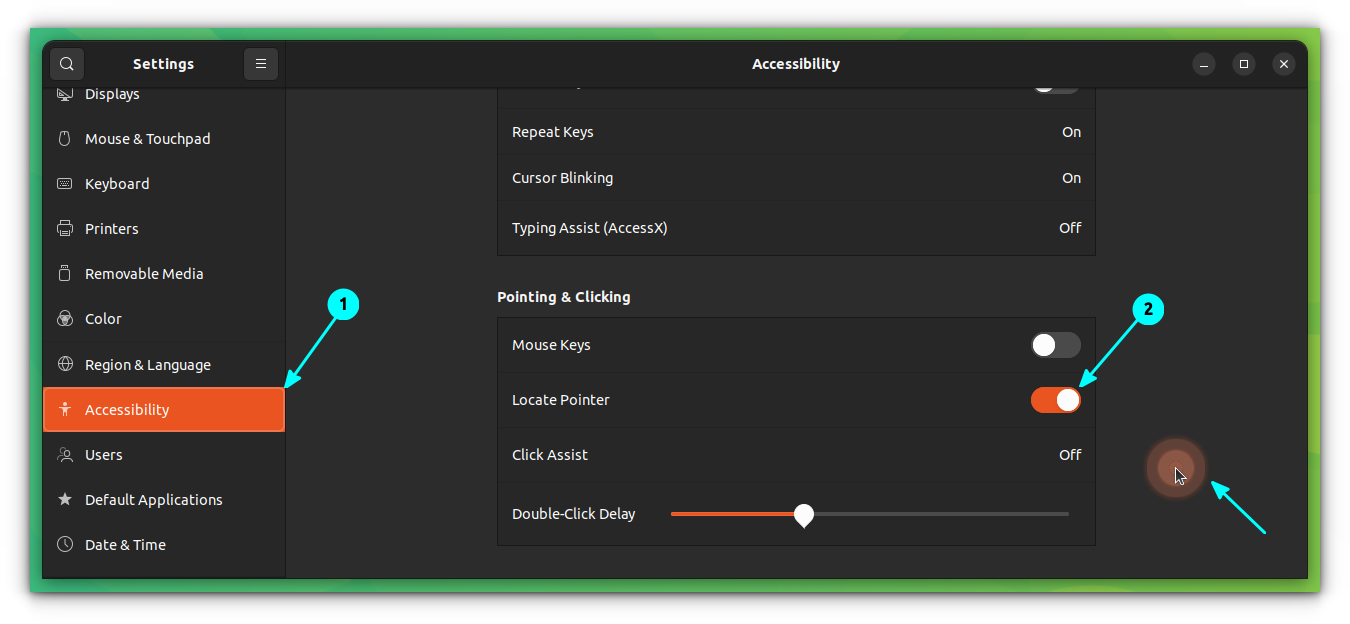
It's FOSS on Nostr: Quick Ubuntu Tip 💡 Lost sight of the mouse pointer? Go to Settings → ...
Quick Ubuntu Tip 💡
Lost sight of the mouse pointer?
Go to Settings → Accessibility → Pointing and Clicking, then turn on “Locate Pointer.” Press the Left Control key whenever you want an animation to reveal the pointer's location.
Published at
2026-09-28 05:00:49 UTCEvent JSON
{
"id": "e57309b1f4f619c87bf3dfab3a209e703f67807e8051b4ef95131b08b614d01c",
"pubkey": "4260bdcbabf20b8d506ceb63d320bf1c2eb2946a83959cc525570d26387a2b02",
"created_at": 1790571649,
"kind": 1,
"tags": [
[
"imeta",
"url https://files.mastodon.social/media_attachments/files/117/346/903/487/553/565/original/0f83ddf4730adfff.png",
"m image/png",
"dim 1350x624",
"blurhash U87BicoPxUw]9GnzX9Nxy:F3M|k9ml,n$*oM"
],
[
"proxy",
"https://mastodon.social/users/itsfoss/statuses/117346903632006483",
"activitypub"
],
[
"client",
"Mostr",
"31990:6be38f8c63df7dbf84db7ec4a6e6fbbd8d19dca3b980efad18585c46f04b26f9:mostr",
"wss://relay.ditto.pub"
]
],
"content": "Quick Ubuntu Tip 💡\n\nLost sight of the mouse pointer?\n\nGo to Settings → Accessibility → Pointing and Clicking, then turn on “Locate Pointer.” Press the Left Control key whenever you want an animation to reveal the pointer's location.\n\nhttps://files.mastodon.social/media_attachments/files/117/346/903/487/553/565/original/0f83ddf4730adfff.png",
"sig": "99d6fb1256b72948db87ef183d91e1291382fa92b5583d25e4d851b54b7db02d84d96ea9260f2ef143eddeabfb47b364869ff1cd5003b7778aa64031e12b49ad"
}