The shell uses existing browser APIs to provide shared services under per-napplet permissions. That lets users compose independent tools without granting each one direct access to everything. Not every API is proxied over the message bus, a shell can grant CSP and sandbox loosening via NAP-SHELL, though we have deferred this functionality in the early stages. It was one of the first capability contracts written, which you would know if you actually read the protocol.
Your centralized gateways already introduce an intermediary that can inject app content. What justifies that trust dependency while making explicit capability mediation pointless?
You say it doesn't make sense, but every time I see you write something about napplets, it is false. If napplets don't make sense, then why did napplets garner more developer support in one afternoon than 44b has in a year?
Consider understanding a topic before spreading lies about it.
quoting
naddr1qv…qracA paint app needs a canvas, some colors, and a way to undo a bad brushstroke. The user probably wants to copy or save the image locally. None of that requires a relay connection or a signing key. If you want to build one, you should be able to spend your time on the editor. And if someone wants to try it, they shouldn't have to trust you with everything else they do.
That's the thinking behind napplets and NIP-5D. A napplet is a small, focused app that runs inside a shell. The shell hosts the app, mediates its requests, and lets the user compose it with other apps. We deliberately put most of the weight on the shell so that building a napplet can stay simple.
Start with the app you want to make
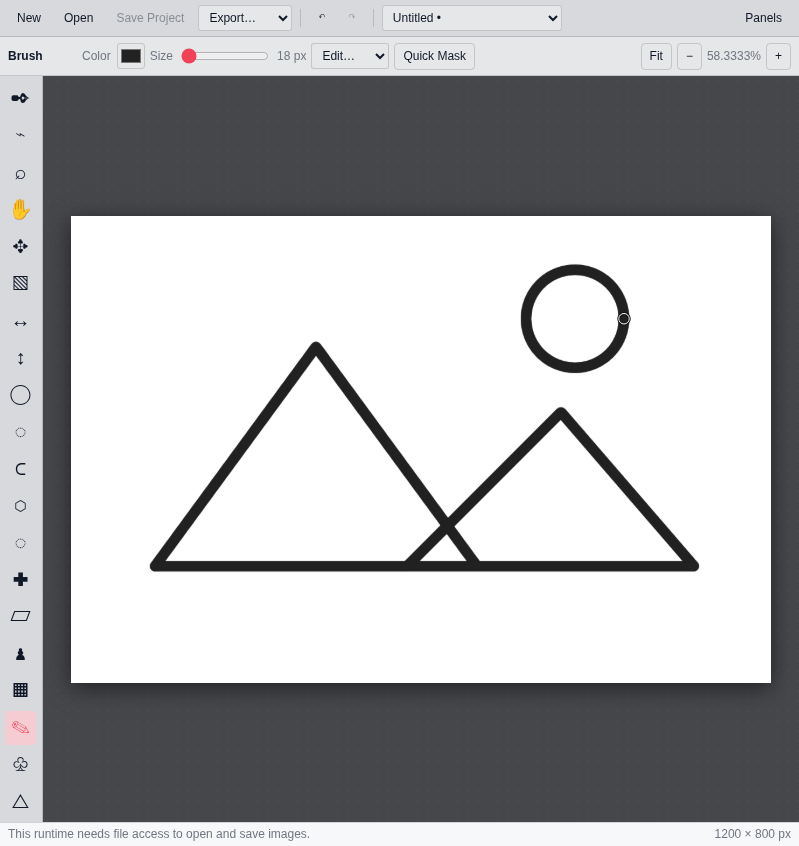
There's already a paint napplet, an image editor called Fotohop, and plenty of games. They don't need to be about Nostr to belong here. Drawing a picture or playing a game doesn't require a social graph or an event to publish.
Fotohop running in the Applesauce napplet loader. Drawing made for this article.
Nostr provides the foundation for publishing and discovering napplets. Inside the app, you can use ordinary browser capabilities for the interface and computation, then ask the shell for any additional capabilities you need. You could build a drawing tool and add sharing later. The limits are the host environment and the capabilities the shell exposes; your app's purpose is yours to choose.
https://cdn.hzrd149.com/95be3bb45b50a27c2279983677250a9773f1784611955d8308b0512ebc8d42cb.mp4
Play Dodgy Duck, an endless voxel crossing game. Watch the gameplay preview
For developers arriving from outside Nostr, that matters. Knowing how to build a useful app should be enough to get started. If the idea needs Nostr features, you can learn the relevant event formats and conventions as you go. Some specialized apps will need quite a lot of protocol knowledge. A paint tool may need none of it.
Why put so much in the shell?
We arrived at this split through research and iteration, including the early prototypes. We looked at the security constraints, the infrastructure developers kept rebuilding, and what users had to understand before they could comfortably try an app. The goal was to make decisions against practical requirements rather than pick an architecture because it sounded elegant.
The balance involves three groups. Protocol developers need somewhere to handle Nostr properly. App developers need a manageable API. Users need a foundation they can trust. Moving protocol infrastructure and privileged operations into the shell gives each group a clearer job: protocol developers work on the shared services, app developers build their apps, and users choose how to put them together.
An app can ask for data and request actions through the shell's capabilities without building its own relay connection manager or signing flow. When someone improves the shell's routing or security, many apps can benefit. Shell developers take on more complexity, but each napplet author has less infrastructure to maintain.
https://cdn.hzrd149.com/ccc178d603389c403521f631f547a163c8748cc3e7609b115c51b010e331859c.mp4
The animated diagram on napplet.run cycles through relay, storage, media, notify, theme, value, upload, resource, and CVM. Requests and responses pass through the shell. Watch the full cycle.
The common contract between a napplet and the runtime providing its capabilities is called the capability seam. NIP-5D defines how it works on the web; individual NAPs define capabilities such as storage, relay access, and resource fetching. The NAP registry describes those contracts. Keeping them separate lets capabilities develop without putting every feature into the core specification, and gives different shells a common contract to implement.
Trust your shell. Distrust the napplets.
That's the footing we want users to have. The system treats napplet code as untrusted because an app can be buggy, carelessly generated, or deliberately malicious. Users shouldn't have to work out which one they're dealing with before the protections apply.
In the web model, the shell verifies the signed manifest and the hash of the app file before running it in a restricted iframe. It then binds incoming requests to the iframe it created. Privileged requests go through shell policy; napplets don't receive signing keys or a general signing and encryption API. The current draft defines that boundary.
Verification establishes which artifact is running, not whether its author means well. The restrictions still have to hold. An iframe sandbox alone doesn't block every network request, either, so shells need appropriate network restrictions. The draft discusses Content Security Policy for that purpose.
This makes the shell a serious responsibility. A bad shell can undermine the model. Broad permissions can weaken the protection, constant approval dialogs can become background noise, and excessive restrictions can prevent useful apps from working. Putting the decisions in one place gives users a place to make an informed trust decision, but shell developers still have to get them right.
That's where napplet/evil comes in. Its deliberately hostile napplets probe sandbox escapes, forged messages, manifest confusion, and access to another app's stored data. A configurable victim shell lets developers weaken protections and observe the consequences. The tests examine what happens when an app claims another app's identity, when a shell renders an attacker-written manifest title as HTML, or when a changed artifact inherits data it shouldn't have.
The project's research roadmap also reports fingerprinting exposure, WebRTC API availability despite the baseline Content Security Policy, and a test where a busy napplet stalled the shell's message handling. These are reported results from its harness, not an audit of every deployed shell. They give developers repeatable ways to challenge the assumptions and check fixes; a passing suite isn't a blanket security guarantee.
Protecting users this way is part of the adoption work. Trying a new app becomes a more reasonable choice when the shell can limit what it does. We want people to enjoy a tool without having to trust its author with everything.
The earlier approach, and NAPP
The NAPP protocol resembles a much earlier approach we explored before writing the napplet spec. We abandoned our own earlier design because it didn't satisfy the adoption requirements we were working toward. The resemblance is in the architecture; NAPP is a separate project.
Both approaches have small apps, a host, and a bridge to shared services. NAPP documents permissions and prompts for sensitive operations, but its bridge exposes NIP-07 signing and encryption methods. NIP-5D deliberately keeps those primitives out of the napplet. We want app developers to request useful operations while the shell handles more of the protocol and security responsibility.
NAPP's application surface is also more Nostr-forward: signing, event-store access, relay helpers, and Nostr actions are prominent. Napplets put Nostr services behind capability contracts alongside storage, media, and resource access. A paint tool or game is as much the point as a feed viewer. NAPP can host non-Nostr apps too; the benefit we're aiming for is making general applications a natural starting point without requiring them to organize themselves around Nostr.
Much like
napplet/evilI put together evil-napps to test that model. It probes launcher isolation, forged bridge messages, action routing, shared-store abuse, and signing permissions. Its documentation distinguishes harness demonstrations from findings checked against the reference launcher's source. As with evil napplets, those findings aren't a fresh audit of every launcher. Both models deserve to have their assumptions tested.Less code to carry around
A focused napplet can leave much of the infrastructure out of its own codebase. That's less code for a person to maintain and less context for a coding agent to consume. An agent building a paint tool can concentrate on drawing, the interface, and the capability contracts it uses.
That smaller scope and shared infrastructure can make napplets cheaper and faster to produce. There isn't a universal token saving or speedup to promise, and an app that pulls in a huge framework or tries to do everything can give much of the advantage back. Runtime costs need the same care: the shell consumes resources, and separate iframes have overhead. A smaller app and less duplicated infrastructure don't guarantee lower total memory use in every setup.
There are shells to try, and gaps to close
This is still alpha. The protocol is changing, and specifications, SDKs, and shells can drift apart. Capability coverage, interoperability, tooling, and the experience of building and using these apps all need work. The intended model and what a particular implementation delivers aren't always the same.
A napplet declares the capabilities it needs, and the shell decides what it can expose. Those declarations aren't permission grants. Optional features need fallbacks, and developers need to check what their chosen shell provides.
You can already explore different takes on the shell in Amethyst, Myco, noStrudel, Grimoire, and napplet.soy. Paja is a developer shell for loading napplets and inspecting their behavior. These projects are at different stages, with different capability support.
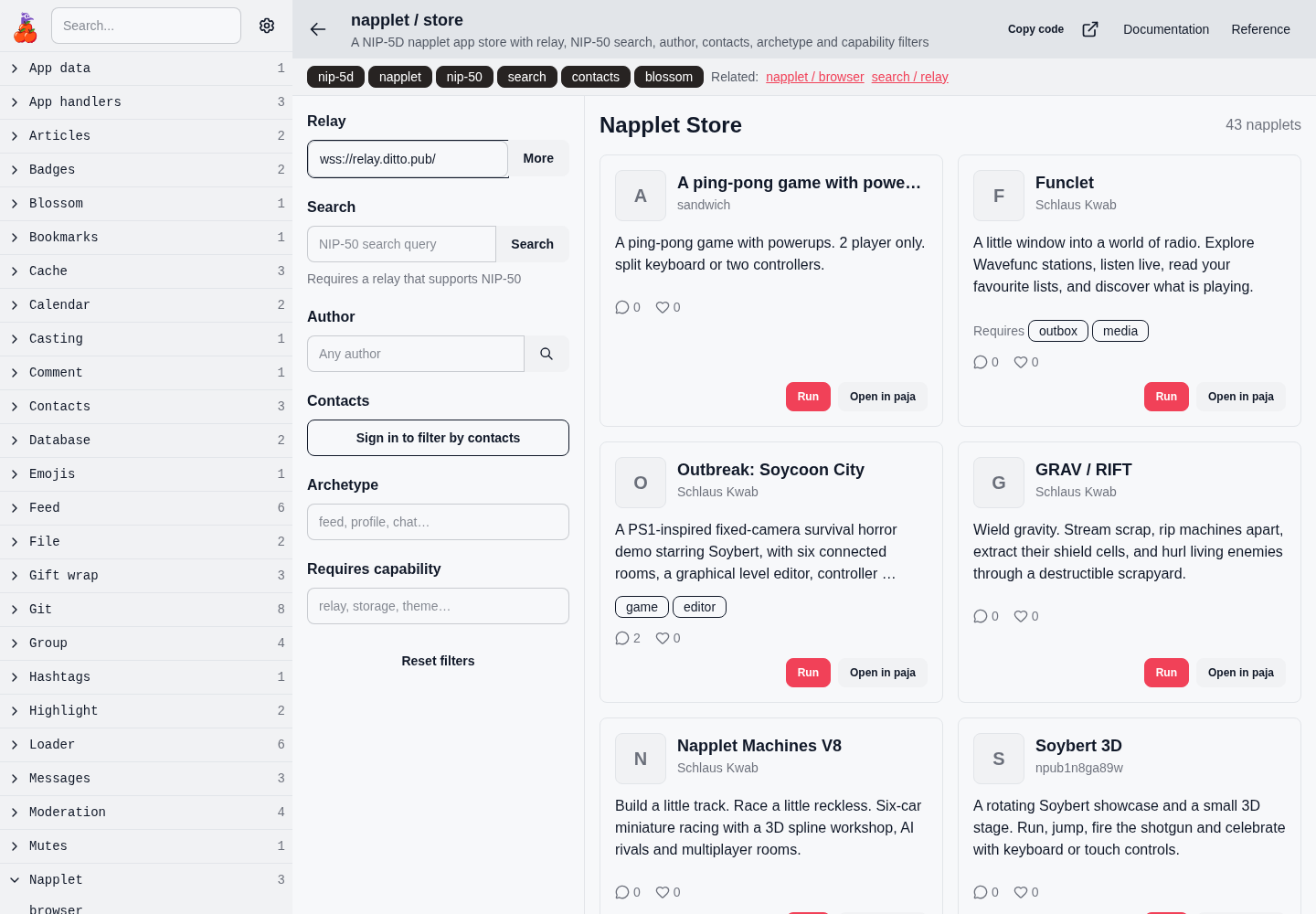
The Applesauce napplet store example shows a live list of apps discovered from Nostr relays. Browse it to see what people are making.
The Applesauce store example discovers napplets from relays. This screenshot is a snapshot; the live list changes.
Developers are working to close the gaps through the SDK and tooling, runtime work, and other implementations linked from the NIP-5D discussion. Those projects give us somewhere to test the design and improve it. Their existence doesn't make the protocol mature yet.
Make it together
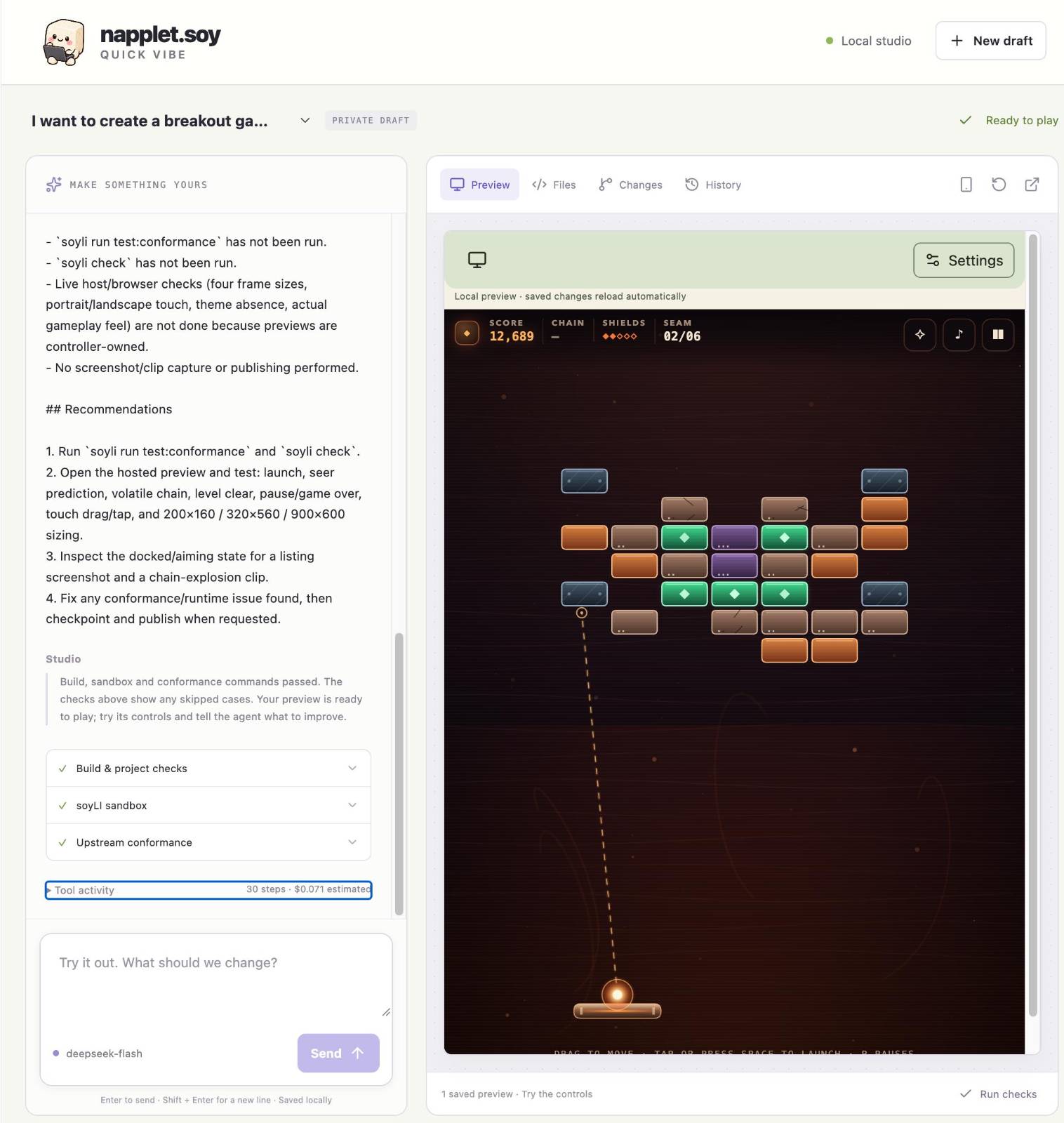
napplet.soy's Studio gives you an interface for building in the browser: describe an idea, play the preview, and ask for changes. You connect a Nostr account and your own AI provider, then review the result before publishing. Its local tools let you work in your own editor or coding agent too.
napplet.soy Studio: ask for changes on the left and try the game on the right. Screenshot supplied by the author.
You can also build on someone else's work. The remix and contribution workflow lets you make your own version of a napplet or propose improvements to the original. For projects with Git source, a proposal includes a playable preview. The author can compare the original and proposed versions, inspect the code changes, discuss them, and merge locally. Publishing the updated app is a separate step.
Say someone makes a game you like, but the controls are awkward on your phone. You could remix it, improve the touch controls with your agent, and send back a version the author can actually play. Other people can try and discuss the proposal on the site. That gives the conversation something concrete to work with before the author decides what to release.
Try making something small
Run
npx skills add napplet/web, open your coding agent, and ask it to use thenapplet-makeskill. Try: “Use napplet-make to build a simple paint napplet with a canvas, a color picker, and an undo button.”Pick one small thing you'd like to use. Ask the agent to verify it and preview it in Paja, then try it yourself.